The problem, however, is that it can be difficult to identify which ones are a good fit for your business.
Whether you’re looking to sell domestically or internationally, or are simply looking for a list of websites like eBay and Amazon, we have put together a complete list of online marketplaces that we believe have the potential to help you expand your reach, test new markets and ultimately grow your business across the globe.
We’ve also provided some of the key information you should be aware of, including the countries each marketplace is present in, their commission structure and other relevant seller fees.
Short on time? Download the full list here, complete with bonus content such as each marketplace's fulfilment services and marketing options.
United Kingdom
United States
Europe
Asia-Pacific
Latin America
UK Online Marketplaces
The UK is one of the world’s largest eCommerce markets, with a value of approximately £170 billion, making it one well worth targeting.
Below, we have outlined some of the UK’s biggest online marketplaces, including a number of key Amazon and eBay alternatives, each of which we believe will give you the exposure and reach you need to sell to UK consumers.
Amazon

Thanks to its global presence, increasing popularity and extensive reach, Amazon is a great marketplace to list your products on.
In fact, with annual sales hitting over £6 billion in the UK alone, it provides a significant opportunity for you to generate more sales and ultimately grow your business.
Amazon also operates a highly successful fulfilment service, Fulfilment by Amazon (FBA), which enables merchants to reach the marketplace’s most active and loyal customer base – Amazon Prime users.
While Amazon is one of the biggest marketplaces in the UK, do also keep in mind that they operate international sites in 13 other countries worldwide.
If you're planning on expanding your Amazon business, ensuring that you have the infrastructure in place to scale without error is crucial. We've covered everything you need to know here.
eBay

Another marketplace that online sellers see a lot of success on is eBay. Similar to Amazon, eBay has a worldwide presence, a huge customer base and a significant number of tools and resources available to help online retailers successfully grow their business.
eBay also offer various programmes for international selling, which you can learn more about here.
Their fulfilment service, eBay Global Shipping Programme (GSP), also enables sellers in both the UK and US to sell to international customers, without the hassle and risk of dealing with the processes that come from cross-border selling.
eBay sellers also have the option to open an eBay Shop (subscription fees starting from £19.99) to benefit from better branding opportunities and merchandising tools, amongst other things.
Already selling on eBay and keen to sell more? Take a look at these eBay seller tips.
GAME Marketplace

If you sell products in either the gaming, media, computer hardware or toys and collectables sector, you should definitely consider selling on GAME Marketplace.
Despite still being a relatively new marketplace, the GAME brand itself is huge in the UK, supporting its marketplaces rapid growth.
In fact, they have already seen a 250% year-on-year increase in sales, and are processing 12,000 orders each month from more than 250 retailers, so it really is an Amazon alternative worth considering.
What’s also great is that there are no set-up costs, listing fees or subscription fees, and the only charges are their commission rates which are competitively priced.
They also provide dedicated support during your on-boarding process, not to mention extra promotion of your products through their own marketing activities.
Folksy

If you’re looking for selling sites similar to Etsy, then British marketplace Folksy could be a great alternative.
With over 250,000 sellers to the site every month, Folksy is in fact a worthwhile option for sellers of handmade goods and craft supplies.
Now with regards to cost and fees, sellers have two options; a pay-as-you-go Basic account, suitable for sellers with a low stock quantity, or Folksy Plus, better suited to frequent sellers or those with a larger inventory.
While commission rates are 6% for both, it is worth noting that there is a £5 subscription cost for the latter plan, although with this option the £0.15 listing fee is waived.
Regardless of which plan you opt for, there are a number of benefits to selling on Folksy, including the option to personalise your shop page and set up your own URL, promotional options and dedicated support.
Fruugo

With a customer base spanning 23 different countries and the ability to automatically translate your product listings into 11 languages, Fruugo has become a popular choice for sellers looking to reach international markets.
Specifically, UK-based Fruugo is a great fit for retailers across most industries, with product categories ranging from clothing to home & garden, right through to health and beauty and consumer electronics.
While the marketplace doesn’t charge a monthly fee or listing fee, it does charge a flat 15% commission on each sale, as well as a 2.35% funds processing fee.
OnBuy

Since launching in 2016, OnBuy has become one of the fastest growing online marketplaces in the UK.
With a product catalogue covering almost every category, from health & beauty and clothing, right through to car parts, technology and collectables, there's a good chance that OnBuy could be a great fit for your online business if you’re looking to increase your sales.
In fact, the marketplace offers some lucrative benefits for sellers, including immediate payments (where the funds are released to your PayPal account as soon as you dispatch an item), risk-free selling for Standard sellers (OnBuy will waive the monthly subscription fee if you don’t make £500 that month) and product promotion through Google Shopping, Bing Shopping and other external marketing channels at no extra cost to your business.
That’s not all though.
OnBuy have partnered up with PayPal to offer PayPal Seller Protection, which will cover you if you have any issues with eligible orders.
When it comes to pricing, the marketplace offers two account packages; Standard (£19 per month excluding VAT) and Partner (£39 per month excluding VAT).
Commission rates are also incredibly competitive, with consumer electronics incurring a 5% fee, and everything else a 9% commission fee.
Keep in mind that a PayPal payment fee of 1.9%-3.4% will also apply, as well as a 20p fee per transaction.
European Online Marketplaces
Thanks to the UK’s close proximity to mainland Europe, it is relatively simple for sellers to target European customers and ship to these markets.
With this in mind, we have compiled information about the leading online marketplaces across Europe below.
Allegro

As one of the top online marketplaces in Eastern Europe and the fifth largest in Europe as a whole, Allegro is a great site to sell on if you looking to expand in this market.
Operating from Poland, Allegro has more than 14 million customers, 90% of which regularly purchase from the marketplace.
That’s not all though.
Thanks to its close proximity to additional Eastern Europe markets, it also makes it a great option for growth in this region.
Ultimately, there are a number of benefits to selling on Allegro, including marketing and advertising support, a dedicated support agent, as well as their dedicated seller Brand Zone.
It is worth noting, however, that all listings must be translated into Polish, which may come at an additional cost to your business.
Bol.com

As one of the most popular marketplaces in the Netherlands, Bol.com is one worth setting your sights on if you’re looking to reach Dutch consumers.
In fact, with 8 million active customers across not only the Netherlands, but also Belgium, Bol.com is a great Amazon alternative in the Benelux region, with a product catalogue spanning everything from books to household goods, right through to health and beauty.
What’s also great about selling on Bol.com, is that you only pay commission on items sold and there is no set up or monthly fees.
The site also offers an optional advertising programme to increase brand awareness and conversions.
Cdiscount

Cdiscount is one of the most visited eCommerce websites in France, with around 11 million unique visitors to the site every month.
Overall, the marketplace offers a wide range of products in over 40 different categories, including fashion, shoes & accessories, consumer electronics, entertainment and sports equipment, making it a great platform for any retailer looking to expand their business in the French market.
Cdiscount also has a well-developed distribution network, with over 18,500 pickup points throughout the country, as well as their own fulfilment service, Cdiscount Fulfilment, and competitive fees and lucrative payment terms.
Coolshop

Since launching in Denmark in 2003, Coolshop have expanded to six additional European countries, including Sweden, Norway, Finland, Germany, the Netherlands and the UK.
In addition to its European reach, Coolshop is also one of the most competitive marketplaces on the continent, with commission rates starting from as low as 4%, with no monthly membership fee.
That’s not the only reason to consider them though.
The marketplace is also doing its best to eliminate some of the more common cross-border barriers that are stopping sellers from expanding internationally.
As an example, the site allows you to list your products in English with only one price, where they will then calculate the currency for each additional market and deal with machine translation.
Now while this doesn’t necessarily mean you’ll get the best exchange rate possible, it does offer flexibility which allows you to expand into new markets relatively easily.
In addition to this, you do also get support and guidance of a dedicated account manager.
eMAG

As one of the largest marketplaces in Romania, Hungary, Bulgaria and to a lesser extent, Poland, eMAG has a huge presence across most of Eastern Europe, making it a worthwhile option if you’re looking to reach these markets.
As with many other European marketplaces, eMAG is also removing some of the common barriers associated with selling to this part of the world, for example by offering free translation to the top 100 sellers.
That’s not all though.
eMAG also operate their own logistics service and are currently subsidising the cost of shipping products to their centralised warehouses.
What’s more is that they will also subsidise the cost of sending the products back to you if it doesn’t work out.
With this option, you will also be able to offer your customers cash on delivery, which is a standard method of payment in these countries.
FNAC

FNAC is another great French marketplace and, similar to sites such as eBay and Amazon, it allows retailers to list products within a wide range of categories including consumer electronics, media products, sports and leisure equipment and home appliances.
With upwards of 15 million unique visitors to the site every month, as well as a number of other seller benefits, including sales and marketing assistance and technical support, it really is a marketplace you should be considering.
To help you successfully sell into France, we have outlined some key facts and best practices for selling in this market.
Fyndiq

As one of the few marketplaces available in Sweden, Fyndiq offers a great opportunity to reach what can only be described as an incredibly lucrative market.
Unlike more traditional marketplace set ups, Fyndiq is a flash sale site, meaning that they are the seller of record for your products. The downside to this is that they control the sales, in turn giving you a lot less access to the information.
That said, there are no listing, set up or monthly fees when selling on the marketplace, just a flat 15% commission charged on each product sold.
It also offers a low barrier to selling into the Nordic region, by allowing sellers to list in English and by handling all customer service enquiries in Swedish.
For more information about the Swedish eCommerce market, have a read of this.
Okazii.ro

Similar to eMAG, Okazii.ro is a popular marketplace in Romania with over 3 million monthly visitors, making it one to research if you’re looking to expand into this market.
Several other benefits to selling on Okazii include the ability to set up shop in a matter of minutes, take advantage of affordable advertising options and save up to 50% on courier rates.
While there is no membership fee, you will need to pay a listing fee of €0.01 – your first 100 listings are free – as well as a trading commission fee which is category dependent and ranges between 2% and 6.6%.
OTTO

After Amazon, OTTO is the second biggest eCommerce company in Germany, selling more than two million products from over 5,000 sellers.
As a specialist fashion and lifestyle marketplace, OTTO is an incredibly popular selling site to consider if you sell in either of these verticals. What's also great about OTTO, is that while their main focus is on the German and French markets, they do in fact have a global presence, selling into over 20 different countries.
For more information and best practices for selling into the Germany eCommerce market, take a look at this handy guide here.
Pixmania

Pixmania is one of the leading online marketplaces in France, attracting almost 8 million visitors each month.
Its reach does, however, extend beyond France, allowing merchants to sell into 13 other European countries including the UK, Spain, Italy, Germany and Poland.
Overall, the marketplace focuses on hi-tech goods, such as cameras, video, computing, home appliances, toys & gadgets and watches.
Some other notable benefits to selling on Pixmania include their ultra-secure payment system and being able to offer 46 payment options to your customers.
PriceMinister

Part of the Rakuten group, PriceMinister is another incredibly popular marketplace in France. Specifically, the site welcomes over 10 million active users every month and boasts 22 million members.
As with several of the other French marketplaces, PriceMinister-Rakuten does extend its reach beyond France, with 6% of their customer base coming from countries including Belgium, Switzerland and Canada.
With regards to its product offering, the marketplace covers almost every type of product category, making it a direct competitor of eBay.fr. There are also a number of benefits to sellers, including the ability to brand and customise your store, as well as access to both marketing tools and a consultant with expertise in your industry.
Real.de

With over 2.6 million customers, Real.de (formally known as Hitmeister) is one of the most popular marketplaces in Germany, with a product catalogue covering everything from electronics, right through to clothing & accessories and DIY goods.
In addition to its recognition in the German eCommerce market, another benefit to selling on Real.de is that they don’t charge listing fees.
That’s not all though.
The marketplace also provides their customers with exceptional customer service (which is a great reflection on your own business), as well as legal seller protection and various payment options.
US Online Marketplaces
Etsy

With a global presence and active user base, Etsy is a fantastic platform to list on if you sell handmade or vintage goods.
In fact, with over 25 million shoppers worldwide, serviced by around 1.6 million sellers, this niche marketplace really does offer a huge opportunity for business growth.
So, what is there to know about selling on Etsy?
To start with you should note that while there is no monthly membership fee, there is a charge of $0.20 per listing, as well as a 5% commission charged on each item sold (also known as a transaction fee).
Keep in mind that there is also 5% shipping transaction fee and if you’re accepting payments through Etsy Payments, then then there is an additional fee for this (country specific) which is a % of the total sale price and flat fee per order.
Jet.com

Since launching in July 2015, Jet.com has become one of the fastest growing marketplaces in the US, with more than 4 million customers and an estimated GMV of £20 billion by 2020.
The company’s recognition and reach across the US isn’t the only reason to consider selling on Jet.com though.
Jet offers an entirely unique pricing algorithm, offering discounts to customers based on the number of items they buy and the seller’s location. Not only is this driving a larger spend per customer, it is also seeing a repeat customer rate of 23%, higher than both eBay and Amazon.
But what else is there to know about selling on the Jet marketplace?
Well, with regards to fees you should note that there is a rather complex commission structure in place.
While there is a base commission rate ranging from 5-15% depending on your product’s category, the applicable commission you pay is dependent on any commission adjustments made in the Rules Engine. You can learn more about this here.
Do also keep in mind that in order to sell on Jet.com, you will need to have the legal and physical capability to fulfil orders in the United States. This means that even if you aren’t located in the US, you will need to have a fulfilment capability within the country, as well as a valid US Business Tax ID.
Newegg

Newegg is another marketplace worth considering, thanks to its significant presence across the US.
While the marketplace predominantly focuses on computer hardware, it does also sell products from categories such as consumer electronics, gaming, apparel, sporting equipment, and even homeware.
As a Newegg seller, you can expect competitive commission fees, ranging from 9-15%, depending on your product’s category.
If you’re selling from outside the US, Newegg even provide a shortcut for expanding into this market, thanks to their cross-border fulfilment service and customer service.
In addition to this, you will have the chance to work with a Newegg marketing or category manager who can help with promotional activities to help boost your sales on the marketplace.
For more information about selling on Newegg, we would recommend that you take a look at their FAQs here.
Sears

If you are looking to reach a US customer base, Sears is a great alternative to selling on eBay and Amazon.
In fact, like both marketplaces, Sears has an extensive product offering, selling everything from fitness equipment, clothing and jewellery, right through to tools and kitchen appliances.
Now with regards to the cost of selling on Sears, they do charge a monthly fee of $39.99.
Like other marketplaces, Sears do also operate their own fulfilment service, Fulfilled by Sears. With this option, sellers benefit from 24/7 customer support, as well as flexible payment terms thanks to their pay-as-you-go pricing model.
If you’re an international merchant wanting to sell on the Sears marketplace, there are certain requirements you will need to meet.
These include having a US-based warehouse (this can include a third-party fulfilment service, whether that be Fulfilled by Sears or an alternative), a US-based business address (this can be through a partner), a US bank account (again, this can be through a partner such as Payoneer or World First) and a valid US tax ID.
Walmart

Walmart is one of the largest marketplaces in the US, with as many as 110 million unique monthly visitors.
Although the Walmart marketplace has historically only been available to US-based sellers, they are beginning to open the doors to sellers in the UK, Canada and China. That said, this is still by invitation-only.
So, what does it take to sell on Walmart?
The marketplace specifically looks for reputable brands and retailers that offer exceptional customer service, a wide product assortment, reliable fulfilment and competitive pricing.
Do keep in mind, however, that there are certain requirements for successful international sellers. These include having a US entity (including a US W9 tax ID and mailing address), the ability to ship from a US warehouse (excluding FBA) and an international returns address.
Wish

As the sixth largest eCommerce company worldwide, with over 300 million customers, the extent of Wish.com’s reach can’t be ignored.
In fact, with no registration, subscription or listing fees, Wish merchants only pay when they make a sale.
Specifically, the marketplace operates a revenue share pricing model, where they pay you a percentage of your order total. This is typically around 85%.
Other benefits to selling on Wish.com include the option to boost product visibility with paid campaigns, and
Wish also operates its own warehousing and logistics service, Fulfillment by Wish, where you can ship products to customers in both the US and Europe.
Zibbet

US-based Etsy alternative, Zibbet, is another site to consider if you sell handmade goods, fine art, vintage goods or craft supplies.
Zibbet specifically offers three seller accounts; Starter, Pro and Unlimited, with the former starting at only $4 per month and the latter option costing $20 per month.
Regardless of which account you opt for, there are no listing fees, nor are there any transaction fees, making this one of the most competitively priced marketplaces in the US, if not worldwide.
While you can create a free custom domain with each account type, with an Unlimited account you are also able to fully customise it with your branding, remove Zibbet’s own branding and create coupons and discounts.
Asia-Pacific Online Marketplaces
Thanks to the expanding middle classes, increasing mobile and internet adoption and improved infrastructure and logistics networks, the Asia-Pacific region has fast become the world’s largest eCommerce market.
To help you understand which marketplaces could be worth exploring as part of your expansion plans, we have listed some of the biggest sites below.
Alibaba

Alibaba is the world’s biggest online eCommerce company and the leading platform for global wholesale trade.
While Alibaba is more commonly used by the eCommerce community to purchase stock, if you’re a wholesaler looking to sell on the marketplace then you will need to be aware of the four types of membership packages available.
To start with there is a free basic option, however this understandably comes with its limitation – the lowest possible priority ranking and a limit of 50 product postings. While each of the three Gold Supplier Membership Packages on Alibaba come with authentication and verification – helping you to establish trust amongst buyers – the Premium Package offers 1st priority ranking, unlimited product posting, a customised website and personalised customer service, amongst other benefits.
With the Gold Membership Package, Alibaba sellers also have the option to invest in additional promotional activity.
What are the Alibaba Membership Fees?
The annual cost of selling on Alibaba ranges from $1,399 for a Gold Supplier Basic Package, $2,999 for a Gold Supplier Standard Package and $5,999 for a Gold Supplier Premium Package.
While there is no charge for Trade Assurance – that being Alibaba.com’s order protection service, there are some service fees you will be charged following a sale.
These include a payment processing fee, which is dependent on the payment method and varies from a flat $15 fee per transaction, to a percentage of the sale.
In addition to this, there is a service fee of 1-2% for order amounts exceeding $5,000. Anything less than this and the service fee (commission) is waived.
AliExpress

Unlike Alibaba, which is the Alibaba Group’s platform for global wholesale trade, AliExpress is the same company’s retail marketplace selling smaller quantities of wholesale products.
If you’re a wholesaler looking to sell on AliExpress, keep in mind that there are certain requirements. These include the need for a business Alipay account and an agent or brand management with appropriate documentation. You will also need to agree to the pay an annual technical service fee.
Once you have been approved as a seller on AliExpress, you will be able to create your own branded shop on the site.
But besides from the technical service fee, what else does it cost to sell on AliExpress?
Similar to most marketplaces – wholetrade or retail – sellers on AliExpress are charged a commission fee ranging from 5-8% of the transaction total.
Do also keep in mind that Aliexpress charge fee upwards of $1,500, for sellers wanting to create or change their store. This has been introduced in a bit to reduce the number of scammers or bad suppliers getting away from poor ratings.
Alternatively, rather than buying low-volume wholesale stock you can also consider dropshipping with AliExpress, meaning that you purchase a product from a supplier only once it’s sold and have it dispatched directly from the supplier’s warehouse.
Catch.com.au

Previously known as Catch of the Day, Catch.com.au has since rebranded and opened up their Australian marketplace to third-party sellers.
In fact, with over 1 million active customers and a selection of more than 7 million products across a range of product categories, Catch is an ideal platform if you’re looking to sell into the Australian eCommerce market.
The marketplace does, however, remain focused on offering discounted prices and it’s also worth being aware that there are some brand restrictions on products they sell themselves, for example Ugg and Under Armour.
Flipkart

With the Indian eCommerce market growing at a rapid rate, it is certainly worth focusing your attention on the country’s largest online marketplace, Flipkart.
So, what do you need to know about selling on Flipkart?
To start with it’s worth noting just how broad the site’s offering is, with product categories ranging from electronics and sports equipment, right through to fashion and homeware. In fact, the marketplace has over 65% market share in many of them.
Getting started selling on Flipkart is relatively easy for international sellers, with the only real requirement being that you have a local address for handling returns.
In terms of promotional activity, keep in mind that as a seller you will have the option to pay for merchandising packages for additional brand exposure.
GittiGidiyor

Founded in 2001, eBay-owned GittiGidiyor has since become Turkey’s largest eCommerce marketplace, with more than 60 million monthly visits and close to 19 million registered users.
GittiGidiyor offer sellers five store subscription options; Basic, Pro, Mega, Mega+ and Special, with monthly prices starting from 69 Turkish Lira (around £10 per month at time of writing).
In addition to a monthly fee, sellers are also charged commission on each item sold, with rates ranging from 6-17%.
JD Worldwide

JD Worldwide is China’s second largest eCommerce site, offering a relatively simple way for international merchants to sell into the Chinese market.
The site specifically operates two separate models; a reseller model and a platform (marketplace) mode.
With the first option, JD Worldwide will purchase your inventory from you and resell it to Chinese consumers. Alternatively, with the platform model, you have the option to host your products on JD.com and pay a commission on each sale you make – 2-10% depending on your product’s category.
Now while you will be charged a $1,000 USD annual fee for selling on JD Worldwide, the good news is that you don’t need to have a legal entity or bank account in China in order to sell into the country.
The marketplace also provides you with marketing support to boost product visibility, as well as access to the company’s nationwide logistics network.
Kaola

Kaola.com is another Chinese marketplace providing global merchants with access to China’s vast eCommerce market.
Similar to JD Worldwide, the site’s commission structure ranges from 2-10% and incurs a $1,000 USD annual fee.
So, what can you sell on Kaola?
While the marketplace places a big focus on food and high-end products, they do also sell products across categories such as cosmetics, apparel and baby goods.
One of the benefits of selling through the Kaola marketplace is that the entry requirements are lower than several other Chinese marketplaces, for example Tmall.
That’s not the only reason though.
They are also well known for processing payments quickly, which is a plus for the majority of online businesses.
Lazada

Lazada is the leading online marketplace in Southeast Asia, with dedicated marketplaces across Indonesia, Malaysia, Philippines, Singapore, Thailand and Vietnam.
Perhaps the biggest benefit to selling on Lazada, in addition to the site’s 23 million active customers, is the fact that since July 2018, sellers are no longer required to pay commission rates on any sales, nor do they need to pay a sign-up fee.
Instead, sellers must pay a new shipping fee which can be viewed here, as well as a 2% payment gateway fee.
The marketplace is also dedicated to helping sellers get more from the platform, by going as far as creating an online Lazada University portal, with guidance and video support at all stages of the selling journey, from getting started on Lazada, to streamlining operations, right through to maximising sales.
Qoo10

Similar to Lazada, Qoo10 is another online marketplace with a presence across Southeast Asia, with sites specifically in Singapore, Japan, Indonesia, Malaysia, China and Hong Kong. In addition to this, there is a global US version of the site.
When it comes to selling on Qoo10, there are no listing fees and only a variable service (commission fee) ranging from 7-12%.
Unlike many other marketplace’s commission models, the percentage in which a seller is charged is dependent on their seller grade (Power, Good or Normal), and the price of the item.
The site itself lists products across a range of categories, from fashion to beauty & diet, right through to homeware and food & baby goods.
Sellers also have the option to promote their products across the marketplace, for example by offering coupons, discounted prices and on-site promotions.
Rakuten

Not only is Rakuten the leading eCommerce platform in Japan, it is also the fourth largest marketplace in the world, offering a wide range of products.
Not only is Rakuten the leading eCommerce platform in Japan, it is also the fourth largest marketplace worldwide.
In fact, over 80% of the entire population shop on Rakuten, making it a great option for entry into the Japanese eCommerce market.
Unlike many other marketplaces, Rakuten does in fact operate as an online shopping mall, providing you as a merchant with your own shopping space that can be designed with your own branding.
There are other advantages to selling on Rakuten though, including the fact that you are able to carry out CRM activities to nurture first time buyers into repeat customers, and that you have access to a dedicated eCommerce consultant to help you improve your performance on the marketplace.
Do, however, keep in mind that there are different fees and selling criteria for sellers in the US, compared to those in other countries.
Typically, you can expect to pay a registration fee of ¥60,000, a monthly fixed fee starting at ¥50,000 (payable every six months), commission on each item sold varying from 3.5-5.5%, a system enhancement charge of 0.1% and a card payment fee of 4%.
For specific details about Rakuten’s pricing model, have a read of this.
Souq

With close to 80% share in online retail sales in the Middle East, Souq is the number one marketplace across the UAE, Egypt, Saudi, Kuwait, Bahrain, Oman and Qatar.
In fact, the site sells everything from electronics, to sports & fitness goods, to homeware.
That said, in order to sell on Souq there are a few requirements worth being aware of.
To start with, you will need to either have a UAE business license and bank account number, or an authorised agent.
But what about costs?
When selling on Souq.com, there will be an AED 7.5 charge incurred on any order over AED 50, along with a commission fee between 5-20%. Orders lower than AED 7.5 will still be charged the applicable commission rates but will have the order charge waived.
While it is possible to self-fulfil your orders, do keep in mind that the marketplace operate their own fulfilment service, Fulfillment by Souq. With this option, you will also benefit from local-language customer service and their returns service.
For additional ease, Souq also allows sellers to upload their products in English and will automatically translate these listings to Arabic.
Tmall Global

Alibaba-owned Tmall Global is an incredibly popular eCommerce site in China, providing consumers in this market with a platform to easily purchase international brands – anything from clothing to homeware.
Unlike many of Alibaba’s other sites, including Tmall, AliExpress and Taobao, Tmall Global offers easy entry into the Chinese eCommerce market.
More specifically, international merchants are able to sell on the marketplace without the need for a Chinese business licence or physical presence in the country. That said, the site does set the bar high with regards to the brands it accepts, and you can typically expect to wait four to eight months to be approved.
So, assuming you’re successful, how much does it cost to sell on Tmall Global?
The marketplace’s fees can be split into three categories; a refundable deposit ranging between $8,000 and $25,000 (depending on your chosen store format and trademark status), an annual service fee of $5,000-10,000 (dependent on product category) and a 2-5% commission on every sale.
Trade Me

With over 75% of all domestic web traffic, Trade Me is the number one marketplace in New Zealand, making it an ideal platform for reaching consumers in this market.
But what can you sell on Trade Me?
The site itself includes new and used goods across a range of product categories, including clothing, health & beauty, home & living, sports equipment and toys & models.
The process of getting started selling on Trade Me is a relatively simple one and the marketplace fees are also incredibly straightforward.
To give you an idea, there is no monthly membership fee, and you can expect to pay a flat 7.9% commission (success fee) on each item sold, along with a listing fee that varies depending on what it is you sell and type of listing. Low volume sellers with basic listings won’t have to pay a listing fee.
Latin American Online Marketplaces
Another fast growing eCommerce market is in fact Latin America, with countries including Brazil, Mexico and Argentina each growing at a rate of 20% year-on-year. With this in mind, if you’re interested in expanding into this market, now is a great time to get started.
The following marketplaces provide a great opportunity to capitalise on this growth and the overall consumer preference for international brands.
Mercado Libre

As the leading eCommerce site across most of Latin America, Mercado Libre – also known as Mercado Livre in certain countries – is an ideal marketplace if you’re looking to expand into these various markets.
In fact, by selling through their Mercado Libre Cross-Border Trade programme, a single account will allow you to easily sell in Mexico, Brazil, Chile and Argentina.
While you can either use your own logistics or take advantage of the marketplace’s partner carriers (if you’re based in China or the US), you do also have the option to fulfil your Mexican orders using their local fulfilment service.
That’s not all though.
With regards to other cross-border barriers, it’s worth noting that the site also provides an automatic translation tool for titles, descriptions and customer communications.
So, what does it cost to sell on Mercado Libre?
While there are no listing fees, there is a flat commission rate of 17.5% for selling in Mexico and 16% for Brazil, Argentina, Columbia and Chile.
The marketplace also operates a safety payment system, MercadoPago, which offers consumers a range of payment methods.
Learn more about selling in Brazil here.
Linio

With over 3 million products across 60 different categories, Linio is one of the largest online marketplaces in Latin America.
In fact, despite being a Mexican marketplace, Linio has a presence in Argentina, Chile, Columbia, Ecuador, Panama, Peru and Venezuela, reaching a total of 300 million consumers.
One of the advantages to selling on Linio is the fact they offer seven different payment options, making it a popular choice amongst Latin American consumers who tend to have very different payment preferences from one country to the next.
They also offer telephone support, free returns and fast delivery times, as well as incredibly competitive commission rates. You can learn more about selling on Linio here.
Considerations for scaling a business
Expanding your business across different online marketplaces is a great way to reach new audiences, increase sales and maximise profitability.
The challenge, however, is ensuring that you're scaling your operations without putting your business at risk of financial losses, missed sales opportunities and a damaged reputation.
Fortunately, this can be easily prevented.
Whether you're expanding domestically, internationally or both, the right software can connect your sales channels and synchronise your inventory across each, preventing the risk of overselling.
That's not all though.
Scalable inventory management software also ensures you have enough stock to meet demand, while keeping excess stock to a minimum.
Moreover, it provides you with the data you need to make profitable business decisions going forward, such as which channels and products are top performers and those that aren't.
Final thoughts
Ultimately, there are many different online marketplaces to consider across the globe.
While many of the examples above cover a range of different product categories, there will be more niche marketplaces out there so it's certainly worth doing your research. In fact, it's worth taking a look at this list of things to consider before choosing any online marketplace to sell on.
Below, you will find a key for all of the product categories used within each marketplace image. Do keep in mind that we have only used five of the top verticals for each marketplace, and in most instances they do in fact offer a much wider range of products.

Again, if we've missed any marketplaces from the list, simply leave us a comment below!



 Oodle is very popular in parts of Europe, America and Asia for its simple layout and worldwide recognition.
 You can get connected with new clients and build up your business connections quite fast.
 Everything can be sold in ebay starting from your action figure collection to books to computer and electrical parts. Ebay has definitely changed the definition of online classified ads program forever.

 Hoobly has been making the lives of people easier by providing them excellent system backup and spammer free environment. You can always subscribe to the website or create an alert for notifications.
 До недавнего времени на Android телефонах и планшетах функции родительского контроля были ограничены: частично их можно было настроить во встроенных приложениях, таких как Play Маркет, YouTube или Google Chrome, а что-то более серьезное было доступно лишь в сторонних приложениях. Теперь же появилось официальное приложение Google Family Link для реализации ограничений использования телефона ребенком, отслеживания его действий и местоположения.


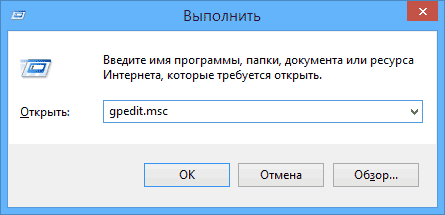
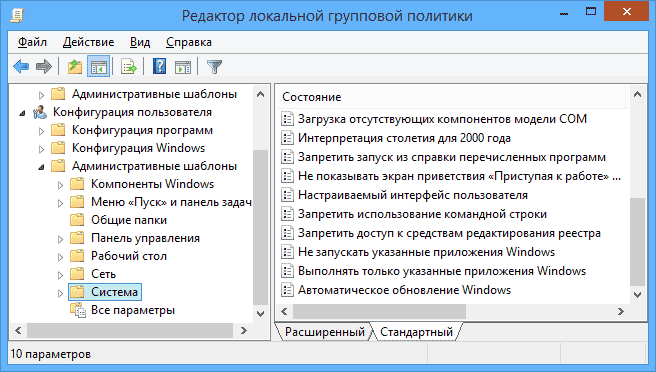
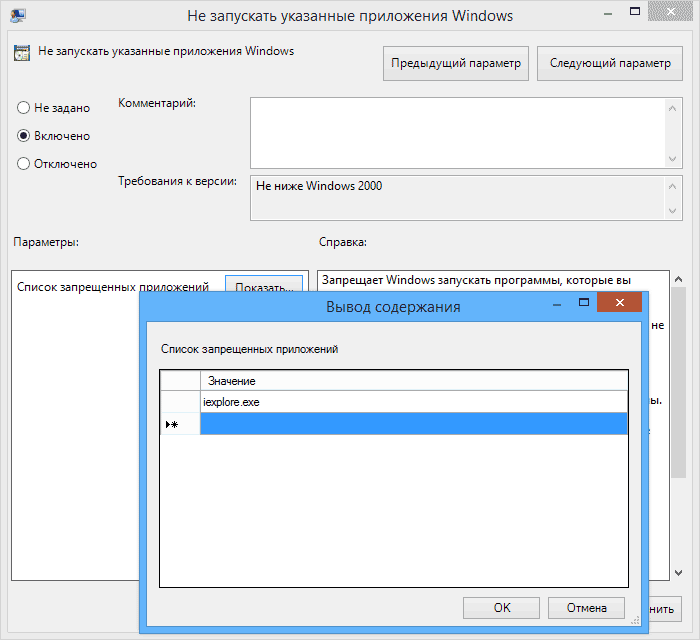
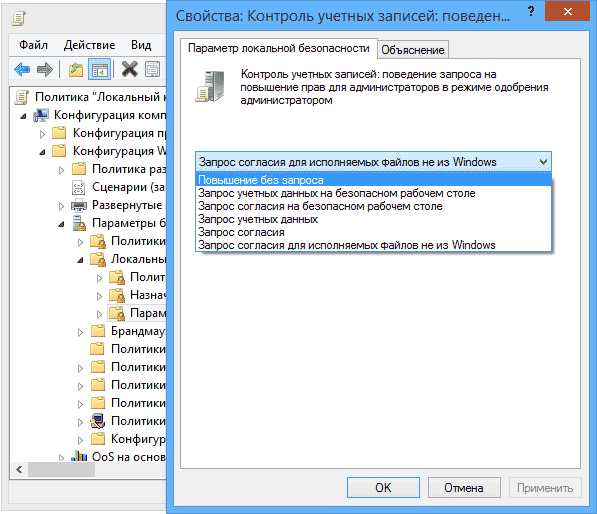
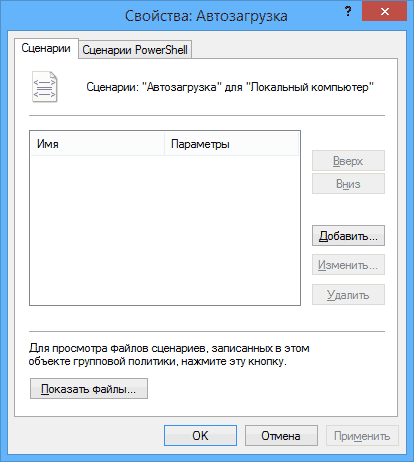
 В этой статье поговорим о еще одном инструменте администрирования Windows — редакторе локальной групповой политики. С его помощью вы можете настроить и определить значительное количество параметров своего компьютера, установить ограничения пользователей, запретить запускать или устанавливать программы, включить или отключить функции ОС и многое другое.